
3 Best Soundbars for Different Rooms in 2026

The short answer
Best for: anyone who wants a clear upgrade over TV speakers without a full surround setup. Match the soundbar's width to your TV or stand, and check whether it includes a subwoofer before assuming you need to buy one separately.
Our top 3 picks
- 1Best complete Atmos package
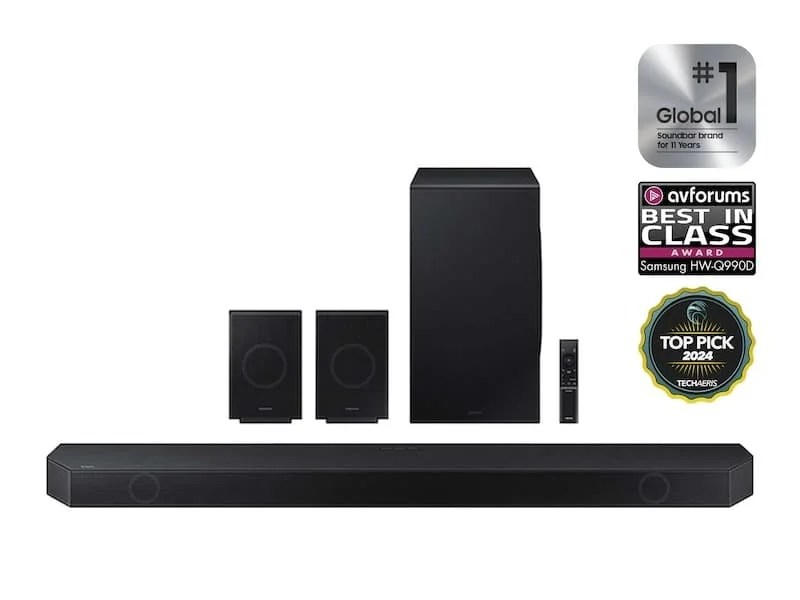 Samsung HW-Q990DView at SamsungRead our analysis
 - 2Best single-bar upgrade path
 Sonos Arc UltraView at SonosRead our analysis
 - 3Best complete Q990F package
 Samsung HW-Q990FView at SamsungRead our analysis
The best soundbar is the one you can place and connect in your actual room. These three choices take two different paths. The Samsung packages include rear speakers and a sub. The Sonos Arc Ultra starts as one bar, with separate speakers available later. That difference matters more than a large channel number.
1. Samsung HW-Q990D: a package with rear speakers
The Q990D fits a buyer who wants the sub and rear speakers in the same purchase. Its listed specifications include an 11.1.4-channel layout, the rear kit and SpaceFit room calibration. That package is its main advantage over a single Arc Ultra. You do not need to plan a separate rear-speaker purchase to get the listed package.
The trade-off is physical. You need a place for the bar and sub, plus rear speakers. You also need their power connections. Wireless audio between units does not mean they run without power cords. Check the manual's wiring plan before deciding that this will remove visible leads from the room.
Who this package fits
It fits a sofa with usable positions for the rear pair. It also fits a household ready to set up the whole package at once. If you have no place for rear speakers, a smaller-box plan may be easier to live with. Buying a rear kit that stays in a cupboard defeats the reason to choose this package.
Think about everyday use as well as movie night. A speaker behind a main walkway can be knocked or moved. A sub beside a door can restrict access. Mark each box location before ordering, including the outlets needed there. Check whether furniture hides or blocks the driver's path.
What the channel label tells you
The 11.1.4 label is the listed channel layout. It is not a promise of eleven separate ear-level boxes. A bar uses drivers and processing to deliver parts of the sound field. The rear units give it physical positions behind the seats. The room still affects where you hear reflected sound.
Use a real Atmos source when checking height playback. Also check a familiar dialogue scene in an ordinary format. A bar should remain useful for daily TV, not just a demo with overhead effects. We cannot tell you how strong that effect will be under your ceiling from a channel count.
Setup costs that do not appear as a price
Leave access to the bar's cable panel. Check the space under the TV for the bar's full height. If you wall-mount it, use hardware and a surface suited to the load. Do not improvise a shelf that covers top-firing drivers.
Then plan the rear positions around seated ear height as the manual directs. Keep the units out of the aisle. If the supplied cables cannot reach safely, resolve that before installation. Do not stretch a power lead across the floor just to make the layout match a diagram.
When to choose another route
Choose the Arc Ultra if one bar now is the actual goal and compatible expansion can wait. Compare the Q990F if you specifically want the newer Q990F package. We have no direct measurement proving one Samsung model sounds better than the other. Their specifications checked on September 26 support a package comparison, not a scored sound ranking.
The Q990D is our fit-based pick for the complete listed surround package. Confirm the exact HW-Q990D variant, rear kit and sub on the current offer. Do not assume a similarly named Q-series bar includes the same boxes.
Our verdict:
Best complete Atmos package
Best for A room that can place the included subwoofer and rear speakers.
View at SamsungKeep in mind: The extra speakers need more space and outlets than a one-bar setup.
2. Sonos Arc Ultra: start with one bar
The Arc Ultra suits a buyer who wants one bar under the TV now. Its optional Sonos sub and rear speakers make later expansion possible. That is its defining difference from the Samsung packages. The first purchase does not have to include rear-speaker positions you cannot use yet.
Sonos's manufacturer page confirms Dolby Atmos and HDMI eARC. It also lists Wi-Fi, Bluetooth, Trueplay tuning, Speech Enhancement and Night Sound. Those features answer different daily needs. They do not make the bar a direct substitute for every receiver or a way to connect arbitrary rear speakers.
Measure the bar, not the screen size
Sonos lists the Arc Ultra at 46.38 inches wide, 2.95 inches high and 4.35 inches deep. Check that rectangle against your stand and TV clearance. A TV diagonal does not tell you how much space its feet leave. A wide enough console may still have no clear space in front of the screen.
Keep the top and sides open as the placement instructions require. Do not recess the bar in a tight cabinet just because the front remains visible. The driver's directions are part of the design. A hidden location can compromise the reason you bought an Atmos bar.
If you choose a wall mount, check the exact Arc Ultra mount compatibility. A mount for the earlier Arc should not be assumed to fit. The source page identifies Arc Ultra separately. Treat the name on the mounting hardware as a real fit requirement.
Check the TV audio path
The manufacturer page distinguishes Atmos via Dolby Digital Plus from formats needing eARC. Dolby TrueHD, Atmos via TrueHD and multichannel PCM require an eARC connection in the listed format notes. That matters if you play discs or use a source with high-bandwidth audio.
Your TV must also accept and pass the chosen format. Connecting a disc player to an ordinary TV input does not prove TrueHD will reach the bar. Check the TV manual and pass-through settings. For a supported stream, check the service plan and title, plus device as well.
Sonos lists an optical adapter as separately sold. Optical is a fallback connection, not a way to unlock all HDMI audio formats. If you own an older TV, check the limits before choosing the bar primarily for Atmos.
Tuning and quiet listening
Trueplay is listed for compatible iOS and Android devices. Use the current Sonos app and follow its instructions. Room tuning may help account for placement, but it cannot create a clear physical path from a blocked driver. Fix the bar's position before relying on software.
Speech Enhancement is meant for voices. Night Sound reduces loud-sound intensity and lifts quieter sounds in the listed description. Check both with the kind of TV you watch. Keep a note of the settings so another household member can undo a change.
Expansion is a brand-specific plan
The manufacturer page describes pairing with Sonos Sub and Era 300 rear speakers. It does not promise support for any powered sub or Bluetooth speaker. If you already own speakers, verify the exact supported pairing. A wireless label does not make different systems interchangeable.
Add the sub and rear speakers to the complete plan before comparing it with a Samsung package. That comparison should include box count and outlets, plus space, even without a quoted price. A single bar today and a full surround system later are two different buying decisions.
Choose the Arc Ultra when staged expansion fits your room and use. Choose a package when the rear positions are ready and you want all the audio units now. This is a fit comparison.
Our verdict:
Best single-bar upgrade path
Best for Someone who wants one bar now and may add a Sonos subwoofer or rear speakers later.
View at SonosKeep in mind: A full surround setup requires separately sold Sonos speakers.
3. Samsung HW-Q990F: a complete Q990F package
Samsung lists the Q990F with an 11.1.4-channel layout with a sub and rear speakers included. It also lists SpaceFit room calibration. Its fit is a room that can accommodate the complete package around the main seats. The newer model name alone is not the reason to choose it.
The choice over the Q990D should come from verified differences relevant to your setup. We therefore do not assign a sound-quality score or promise a specific measured improvement. Check exact current connections and features in the Q990F manual before deciding.
Put the whole package on the room drawing
Start with the bar position under the TV. Add the sub and rear pair, then mark the power outlets. Check the cable and walkway plan. This exposes a common mismatch: a room that looks ready for a bar but has no safe place for the rear units.
The rear speakers are not optional clutter once you buy a package to use them. If you cannot place them, resolve the room or choose the single-bar route. Do not decide to hide them behind tall furniture just to clear the aisle. Check the driver's directions in the model's setup guide.
The sub's best place is also a room question. A neat-looking corner is not guaranteed to produce even bass at every seat. Try permitted positions and repeat setup after moving it. Do not treat the calibration label as permission to skip placement work.
Verify your source needs
Write down which devices send audio through the TV and which need another route. Then check the exact Q990F ports and format support. A listing that says Atmos does not settle every disc-player, console and TV combination. The relevant source format needs to reach the bar intact.
Check normal TV control too. A system used every day should have a clear volume and input routine. Verify the remote and app requirements from the manual. We do not assume every brand-integration feature works with every TV.
Decide whether the newer package solves a problem
If the Q990D features already cover your needs, do not invent a reason to upgrade. If the Q990F manual confirms a needed connection or function, record that as the reason. Keep the comparison specific to your source devices and room rather than a broad claim that newer is always better.
The Q990F makes sense when you want its complete package and can place it. It makes less sense when the rear-speaker locations are still unresolved. The Arc Ultra gives a different sequence of purchases, but later Sonos additions bring their own outlet and space needs.
Our verdict:
Best complete Q990F package
Best for A room that can place the included subwoofer and rear speakers around the seating area.
View at SamsungKeep in mind: The soundbar, subwoofer and rear speakers each need suitable placement and power.
Factors to consider when choosing the best soundbar
Match width to your TV or stand first
A bar must fit the furniture or mount safely. Its width does not have to match the TV exactly. Check whether it blocks the screen or remote sensor. Measure the available space, then compare the model's full width and height, plus depth.
Channel count: how much soundstage do you actually want?
- 2.1 (stereo left/right plus a subwoofer, built-in or included) covers the core upgrade most people want: clearer dialogue and fuller bass than TV speakers alone.
- 3.1 adds a dedicated center channel, which sharpens dialogue clarity specifically; useful if you've noticed TV dialogue getting lost under music or effects.
- 5.1 or Atmos-capable soundbars add rear or height channels (either with included rear satellite speakers or upward-firing drivers) for a more enveloping sound field. This is the closest a soundbar gets to a full surround system's sense of space, at the cost of more boxes and more setup.
What's already in the box
Read the included list, not just the hero photograph. The Q990D and Q990F packages include a sub and rear speakers. The Arc Ultra specifications describe optional Sonos additions. A separately sold sub is not part of a single-bar price or delivery box.
Connections: use HDMI eARC/ARC if your TV has it
Use the TV port marked ARC or eARC when the model's manual calls for it. ARC sends TV audio back through HDMI. eARC can carry formats that need more bandwidth. Both ends and the TV's pass-through settings must support the format you want.
Optical can be useful on an older TV, but it is not an Atmos route for the Arc Ultra. Do not expect a format logo on the bar to overcome the TV's output limits. Check the whole source-to-TV-to-bar path.
Soundbar or full surround system?
If you're weighing a soundbar against building out a full speaker-and-receiver system, the soundbar vs. surround sound comparison covers the real trade-offs in cost, setup effort, and sound quality. If you specifically want Dolby Atmos height effects from a soundbar, see the Dolby Atmos soundbar guide.
How we picked these soundbars
We compared the listed product specifications by package contents, room fit and upgrade path. The aim was to separate a complete bar-led surround package from a bar you build around later. There are no test scores, claimed measured output figures or current-price rankings here.
The source facts are dated September 26. Sonos's primary Arc Ultra page was also reviewed on October 1. That page confirms the connection, dimensions, supported formats and optional expansion described below. Merchant stock and the exact seller variant still need checking at purchase.
Keep package contents separate from sound claims
Read each included list. Confirm the sub, rear pair and remote, plus required cables on the exact seller variant. Check the return and delivery details directly with the seller. We do not publish a price or claim stock from dated specifications.
Channel numbers help describe the system. They do not predict how it will sound in your room. A bar with many channels can still be a poor fit under a blocked shelf. Keep the driver path and listening row in the decision.
Check voices and routine controls
Use a dialogue scene you know, not just a bass-heavy trailer. Test from each main seat at the volume you normally use. Check whether quieter speech remains understandable without making effects too loud. If you can try a model before buying, keep processing modes consistent during comparison.
Write a short household setup note after installation. It should say how to change input, set volume and undo a listening mode. That makes daily use easier without assuming everyone will use the phone app.
Map power and placement
Count every powered box. Mark its outlet and cord path. Keep plugs accessible and aisles clear. If a new outlet or structural mount is required, use qualified help. The soundbar manual is not evidence that an unknown wall or electrical circuit is safe.
For height effects, inspect the ceiling and bar position. A blocked top driver or sloped ceiling can alter the reflection path. Virtual processing and physical height drivers are different approaches. Neither guarantees the same effect in every seat.
Match the purchase to the upgrade plan
Choose a complete package if you can use the rear speakers now. Choose staged expansion only after confirming compatible additions. Do not plan around an unrelated wireless sub or rear speaker just because both advertise Bluetooth.
The best soundbar purchase starts with the connection and room drawing. Use the soundbar versus surround comparison if you need free speaker placement and receiver flexibility. Use the Atmos guide to check height playback before buying on an Atmos logo.
More in this guide
Our picks in this topic
3 picks
3 Best Dolby Atmos Soundbars in 2026
How to find the best Dolby Atmos soundbar for your room and viewing habits, judged by the specs and trade-offs that matter, not marketing copy.
Questions people also ask
Do I need a separate subwoofer with a soundbar?
Many soundbars in the mid-range and above already include a wireless subwoofer in the box. Check the specific model's included components before assuming you need to add one; a standalone subwoofer purchase is really only for boosting bass beyond what a soundbar's own sub already provides.
Is a 5.1 or Atmos soundbar worth it over a simple 2.1?
It depends on how much of the room you want filled with sound. A 2.1 or 3.1 soundbar clearly improves on TV speakers for dialogue and general clarity. Multi-channel and Atmos-capable soundbars add a wider, more enveloping sound field, which matters more in a larger room or for viewers who care about movie sound design specifically.
Soundbar vs full surround system: which should I get?
See the dedicated comparison for the full trade-offs, but the short version: a soundbar is far simpler to set up and takes up much less room, while a full surround system generally sounds more precise and immersive at a given price point.